
Every app on this list promises the same trick: hand it a long video, get back Shorts. What separates them is not the promise but the plumbing, and the plumbing starts with conversion. A repurposing app is a video file format converter wearing an AI hat: it ingests whatever your recording is, normalizes it, finds moments, and exports vertical clips. Where that work can happen at all is decided by platforms, so we counted the platform split across the 206 tools in our database before ranking the ten.
The platform split decides where repurposing happens
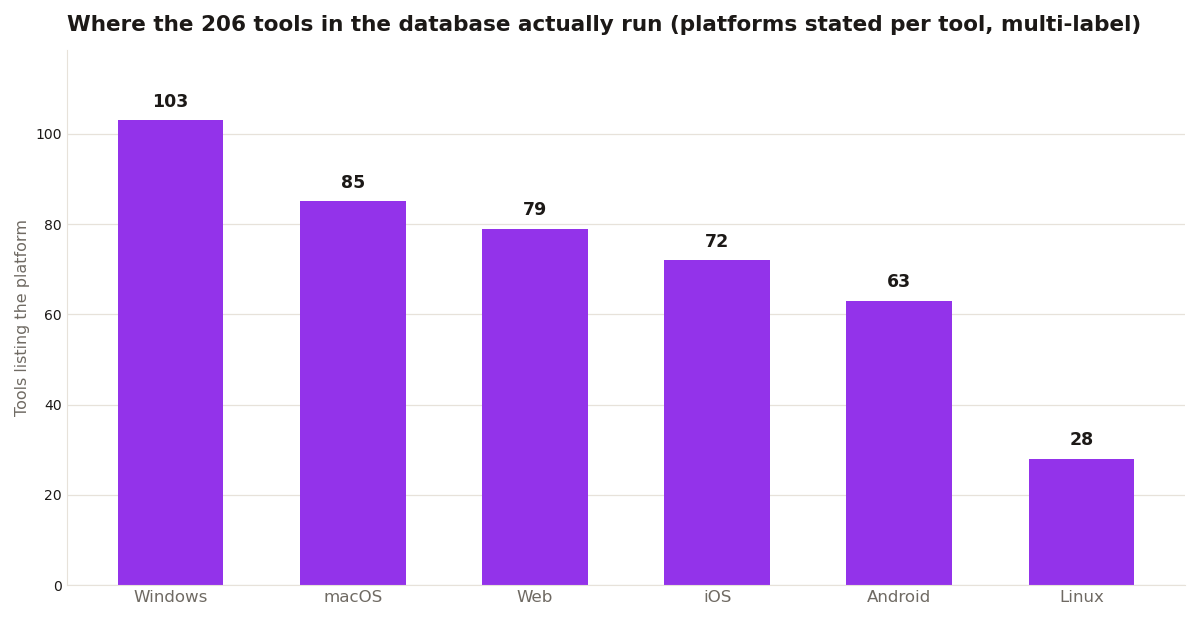
Windows is still the biggest single platform in the database, listed by 103 tools, with macOS at 85. But repurposing is rarely a desktop job. Web tools number 79, and 73 tools list a phone platform: 72 list iOS, 63 list Android, and 62 list both. Linux trails at 28. In practice that means the long-to-Shorts workflow lives in a browser tab or on a phone, backed by cloud conversion, which is exactly how the apps below are built.
The pricing shape matches the workflow. Of the 206 tools, 103 are freemium: a free taste, then a meter. Clipping apps push that model furthest because their costs scale with your minutes, so the free tiers below are best read as trials of the moment-finding, not as free products.
The 10 apps
1. Opus Clip: AI moment-finding with virality scores. Free tier exists, paid from $15/month. 2. Vizard: clipping plus scheduling in one tab. Free 60 minutes a month. 3. Qlip.ai: strong caption styling, multi-language support. 4. CapCut: free manual editor with best-in-class auto-captions. 5. Descript: transcript-based editing, then clip extraction. Best when the source needs real editing. 6. Submagic: caption-first clipping with trendy templates. 7. 2short.ai: face-tracking auto-framing for talking-head videos. 8. Riverside: records in studio quality and now clips highlights automatically. 9. Streamladder: built for Twitch streamers, turns streams into TikToks automatically. 10. Eklipse: gaming-focused auto-clipping that detects kills, wins, and funny moments.

Before you upload the master
One filter decides whether any of these work for you: does your source file get in the door? Cloud clippers convert on their servers, but odd containers and codecs still fail uploads, and a two hour MKV master is the classic casualty. Run the source format through our format compatibility checker first: the database records what each tool states it supports, so you can convert a stubborn master to MP4 once, locally, instead of debugging a failed upload at midnight.
The shelf these apps sit on
It helps to know how small the repurposing shelf is inside the wider market. Across the 206 tools in the database, the biggest categories are online editors at 30, consumer photo editors at 23, open source tools at 22, and AI image tools at 22. Dedicated AI video tools, the category most of this list belongs to, number just 19, with 18 mobile video editors close behind. So the ten apps above are not ten picks from hundreds. They are most of the serious shelf, which is why the same names recur in every comparison you read.
The ingest side of that shelf is worth one more number. Among the 138 tools that publish a format list, MP4 is named by 72, so a long video that is already an MP4 walks into almost anything. MKV is named by 20, and by no mobile tool at all. Streamers and podcasters sitting on MKV masters are the exact users who hit the upload wall, and a single local conversion to MP4 before uploading is the cheapest fix in this entire workflow. Do it once and every app on the list becomes an option again.
One last practical note on order of operations. Repurpose first and edit second sounds backwards, but it matches how the tools are priced: the AI apps charge for the minutes they scan, not the clips you keep. Scanning the full master once and then polishing the three best clips in a free editor costs less than re-uploading trimmed versions every time you change your mind about a moment.
Ten apps, one filter: does it find moments or just cut video? AI moment-finding (Opus Clip, Vizard, Eklipse) saves the scrubbing hour. Manual tools (CapCut, Descript) give control. Match the tool to the bottleneck: if finding moments is the pain, buy the AI. If polishing is the pain, the free editors are enough.